Workbench Mail Tab Overview
The Mail tab can be accessed from the Workbench by selecting the PrescribeIT tab > Mail tab. The Mail tab stores all incoming and outgoing Clinician Communications.
To learn more about the window, select one of the highlighted areas.
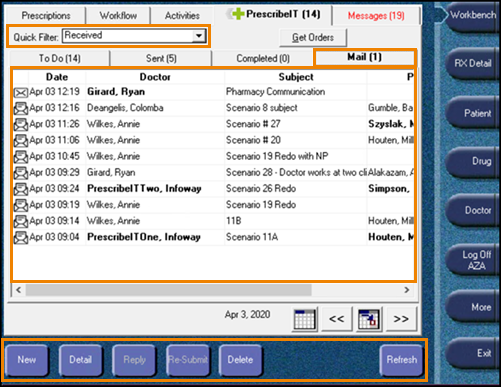
Table 1. Mail Tab Features Overview
| Field | Description |
| Quick Filter |
Filters the communications. Received is the defaulted filter selected when the Mail tab is opened. The following options can be selected:
|
| Mail (#) | Displays the number of unread communications in the Mail tab. |
| Communications Summary |
Provides a summary of communications by displaying the following information:
|
| Action Buttons |
The following actions can be performed in the Mail tab:
|
 - Unread communication
 - Read communication
 - Draft communication
 - Sent communication
 - Failed communication